MCP CONNECTOR
Insite inside your AI assistant
Connect Insite to the AI tools you already use and ask about your projects in plain English. Live project data, your existing permissions, no exports.
Works withChatGPTClaudeGeminiCopilotAny MCP assistant
AI assistant

connected
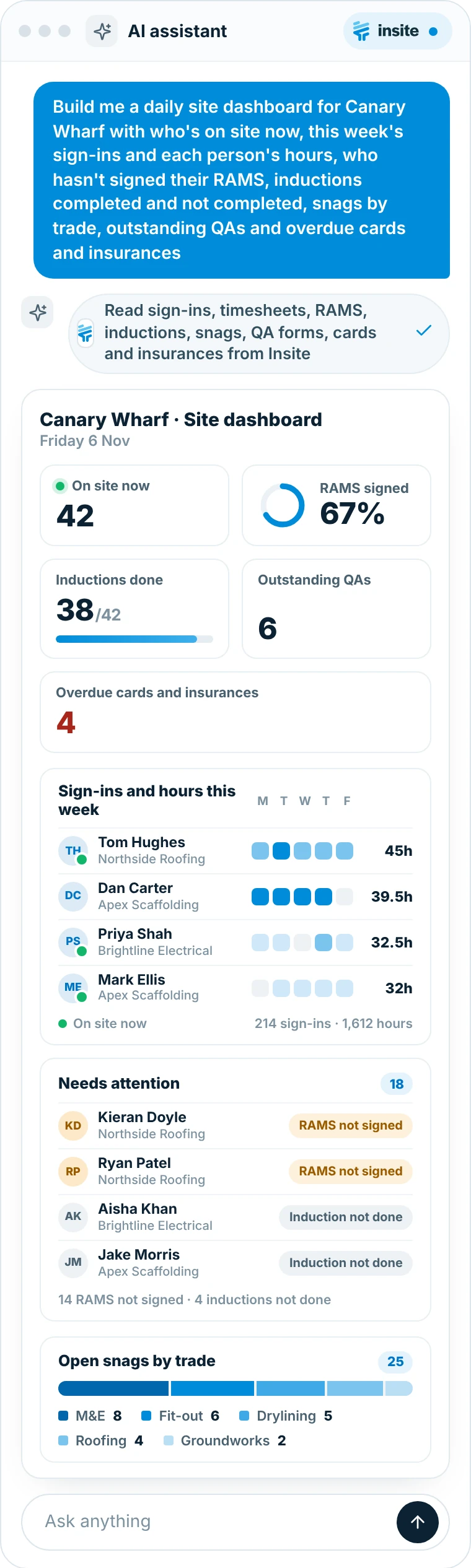
Build me a dashboard for Canary Wharf with who's on site now, this week's sign-ins and each person's hours, who hasn't signed their RAMS, inductions completed and not completed, snags by trade, outstanding QAs and overdue cards and insurances
Reading Insite

Read sign-ins, timesheets, RAMS, inductions, snags, QA forms, cards and insurances from Insite
Canary Wharf · Site dashboardFriday 6 NovCharts drawn by your assistant
On site now42
RAMS signed67%
Inductions done38/42
Outstanding QAs6
Overdue cards and insurances4
Sign-ins and hours this weekMTWTF
THTom HughesNorthside Roofing45h
DCDan CarterApex Scaffolding39.5h
PSPriya ShahBrightline Electrical32.5h
MEMark EllisApex Scaffolding32h
On site now214 sign-ins · 1,612 hours
Needs attention18
KDKieran DoyleNorthside RoofingRAMS not signed
RPRyan PatelNorthside RoofingRAMS not signed
AKAisha KhanBrightline ElectricalInduction not done
JMJake MorrisApex ScaffoldingInduction not done
14 RAMS not signed · 4 inductions not done
Open snags by trade25
M&E 8Fit-out 6Drylining 5Roofing 4Groundworks 2
Ask anythingBuild me a dashboard for Canary Wharf with who's on site now, this week's sign-ins and each person's hours, who hasn't signed their RAMS, inductions completed and not completed, snags by trade, outstanding QAs and overdue cards and insurances
AI assistant
connected
Build me a dashboard for Canary Wharf: who's on site, this week's hours, RAMS not signed, inductions, snags by trade, QAs and overdue cards

Reading Insite
Read sign-ins, timesheets, RAMS, inductions, snags, QA forms, cards and insurances from Insite
Canary WharfFriday 6 NovDrawn by your assistant
On site now42
RAMS signed67%
Inductions38/42
Open QAs6
Overdue cards and insurances4
Sign-ins and hoursMTWTF
THTom HughesNorthside Roofing45h
DCDan CarterApex Scaffolding39.5h
PSPriya ShahBrightline Electrical32.5h
On site now214 sign-ins · 1,612 hours
Needs attention18
KDKieran DoyleNorthside RoofingRAMS not signed
AKAisha KhanBrightline ElectricalInduction not done
Open snags by trade25
M&E 8Fit-out 6Drylining 5Roofing 4Groundworks 2
Ask anythingBuild me a dashboard for Canary Wharf: who's on site, this week's hours, RAMS not signed, inductions, snags by trade, QAs and overdue cards

Trusted by contractors and teams across the UK


THE PROBLEM
Your project data is stuck where your AI can't reach it
The answers are already in Insite. Getting them into the tools your team uses every day takes too long.
Project data stuck in one app
The answers are in Insite, but the AI tools your team uses every day can’t see them.
Exporting to spreadsheets to answer one question
Someone downloads a report, filters it and builds a chart, just to answer a quick question.
Copying and pasting into an AI chat
Pasted data is out of date the moment you paste it, and it’s easy to share more than you meant to.
A different integration for every tool
Every new tool needs its own connection, set-up and upkeep.
HOW IT WORKS
Up and running in four steps
Add Insite once and ask about your projects in plain English.
1
Add Insite to your assistant
Add Insite to your AI assistant as an MCP connector.
2
Sign in with Insite
Sign in with your Insite account. No new logins to manage.
3
Ask in plain English
Ask about your projects the way you’d ask a colleague.
4
Get answers from live data
Answers come from live project data, limited to what you can see.
MCP
Sign-insTasksRAMS
Reads live project data · one wayAI assistantInsite
Who's on site today?
42 people on site, 67% RAMS signed
ChatGPTClaudeGeminiCopilotAny MCP assistant
See the MCP connector in action
WHAT IT CAN READ
What your assistant can read
Your assistant only sees what the signed-in person can already see in Insite.
Projects, people and tools
Your projects, who’s on each one, their roles and the tools set up on each project.
Tasks
Open, overdue and completed tasks, and who they’re assigned to.
Timesheets and sign-ins
Who signed in to site, when, and the hours recorded.
RAMS signature status
Who has and hasn’t signed each RAMS on the project.
Forms
Submitted forms such as inspections, permits and daily reports.
Lists
Checklists such as snagging, with the status of each item.
Inductions
Who has completed each site induction.
Needs Workforce Management
Competency cards and insurances
Directory cards and insurances, with expiry dates.
Plan and project admins only
DAILY DASHBOARD
A site dashboard in one question
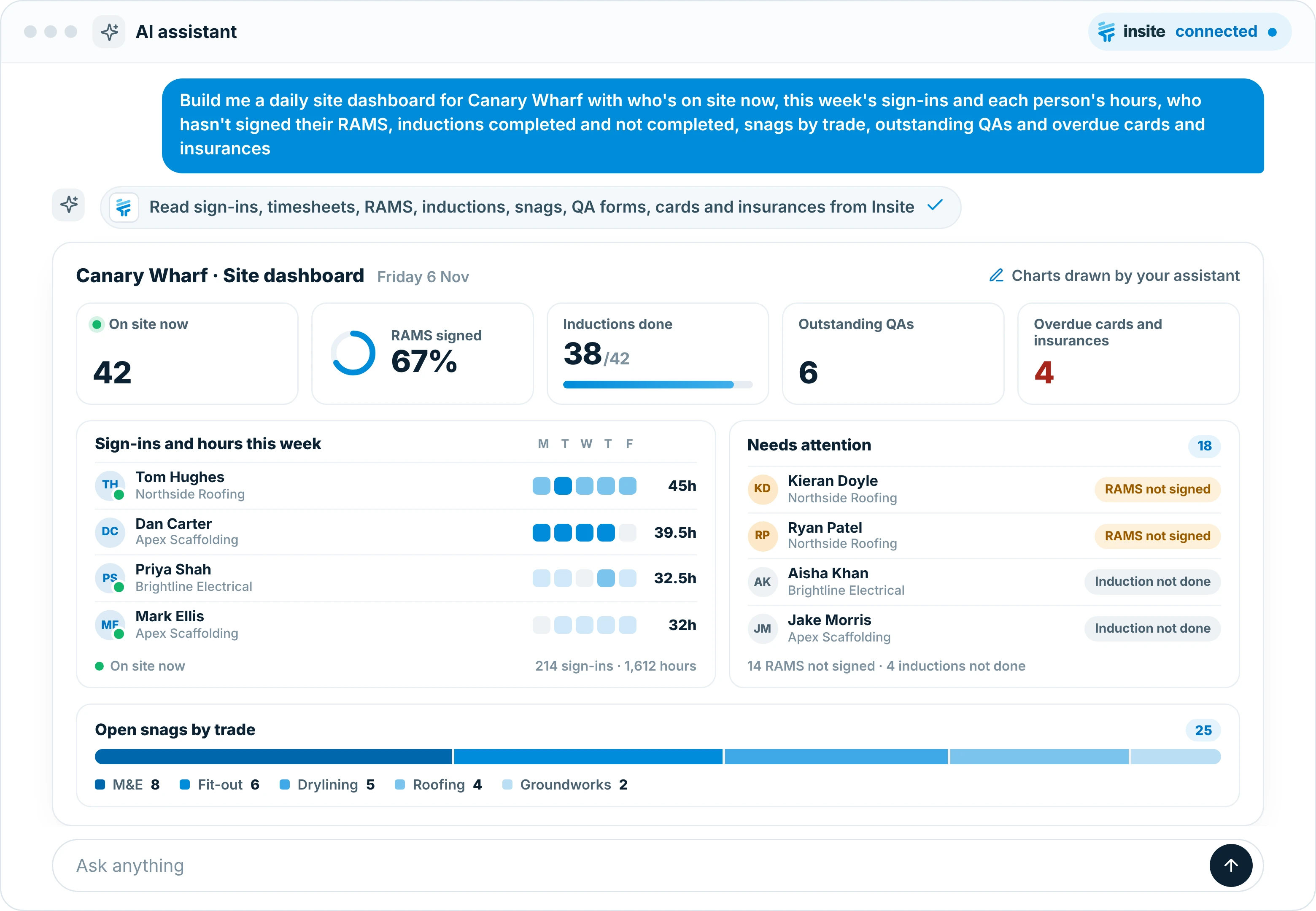
Say what you want on it and your assistant builds it from live Insite data: who’s on site now, each person’s hours this week, who hasn’t signed their RAMS, who still needs an induction, snags by trade, outstanding QAs, and overdue cards and insurances.
People on site, sign-ins and hours worked in one view
Charts drawn by your assistant from live project data
Ask again tomorrow for tomorrow’s numbers
RAMS AND INDUCTIONS
See who still needs to sign
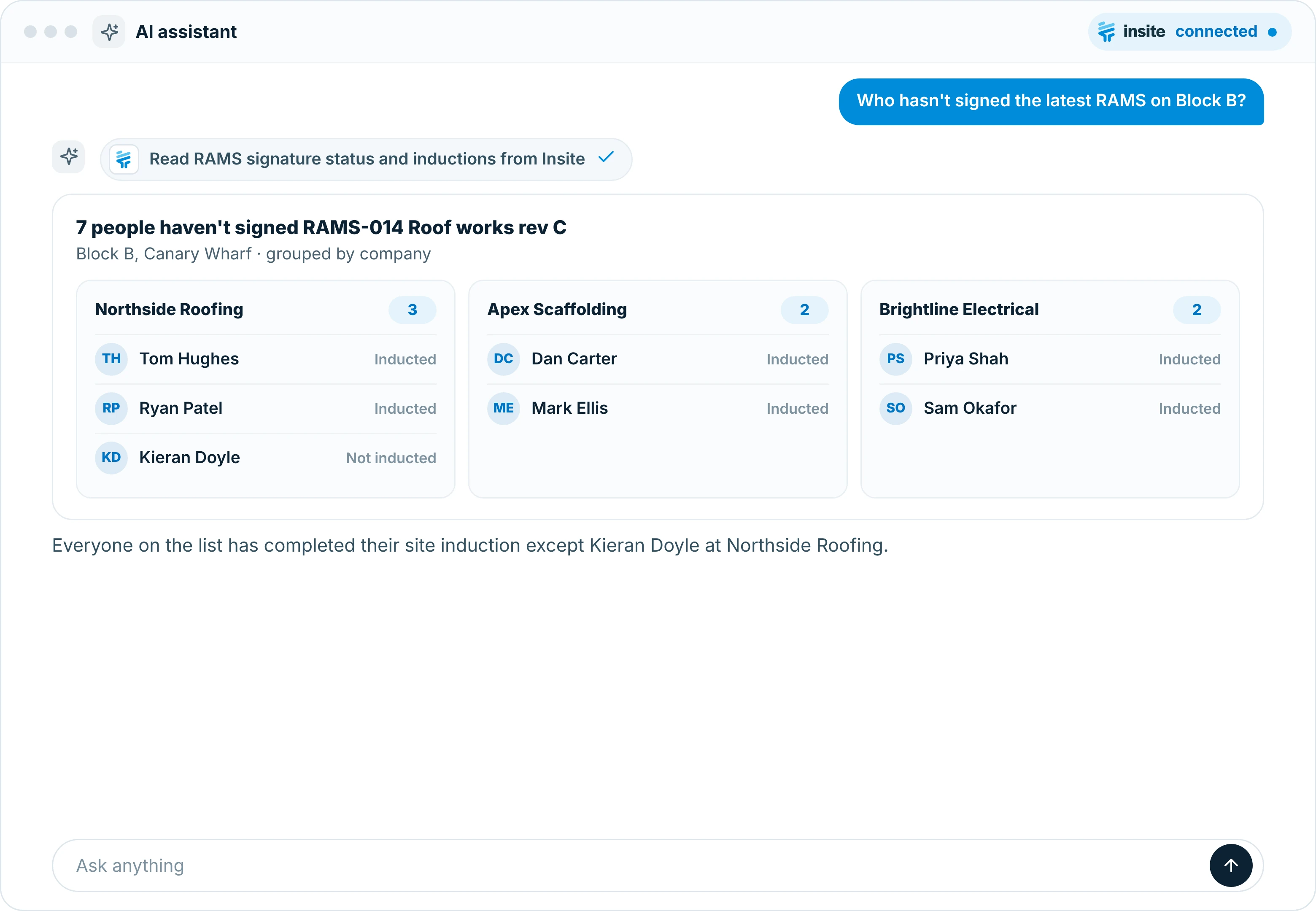
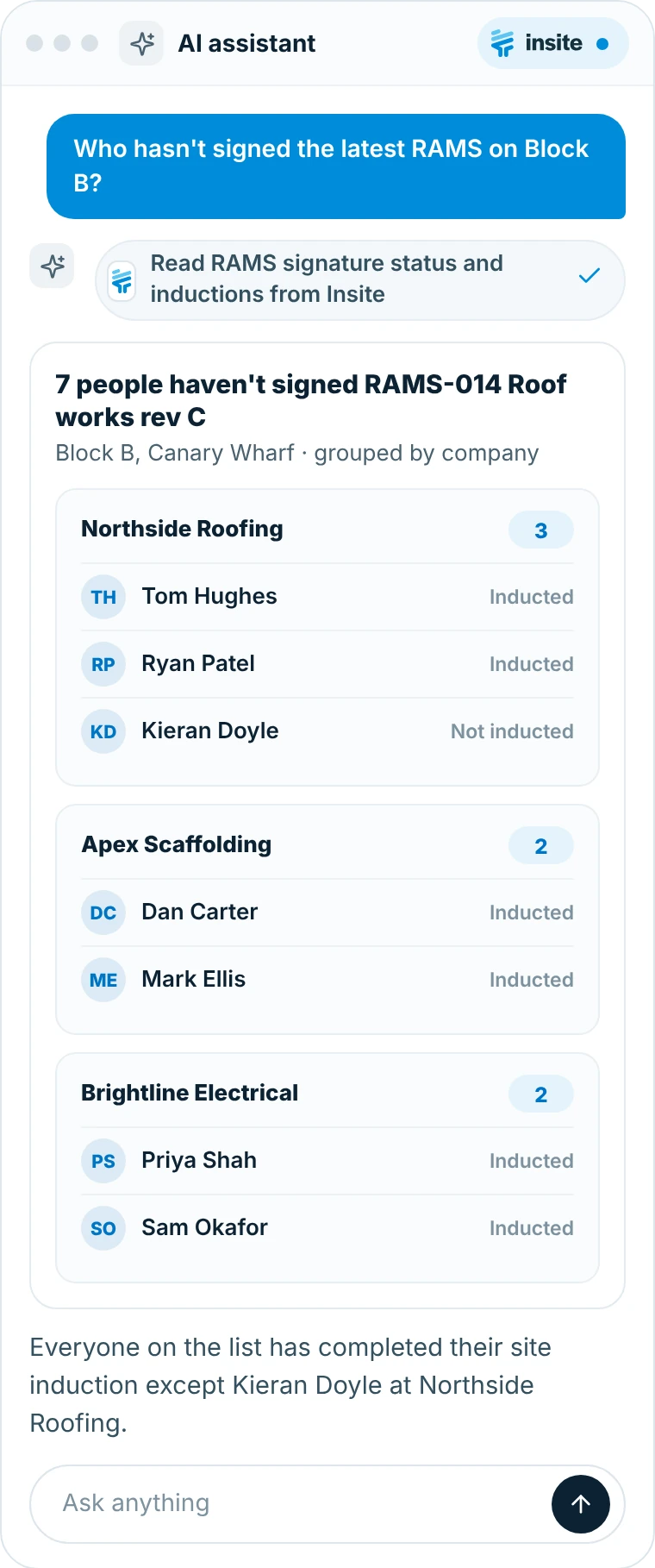
Ask who hasn’t signed the latest RAMS on Block B and get the answer grouped by company, with induction status alongside.
RAMS signature status by person and company
Induction status, with Workforce Management
Only the projects you can see in Insite
CARDS AND INSURANCES
Spot expiring cards and insurances early
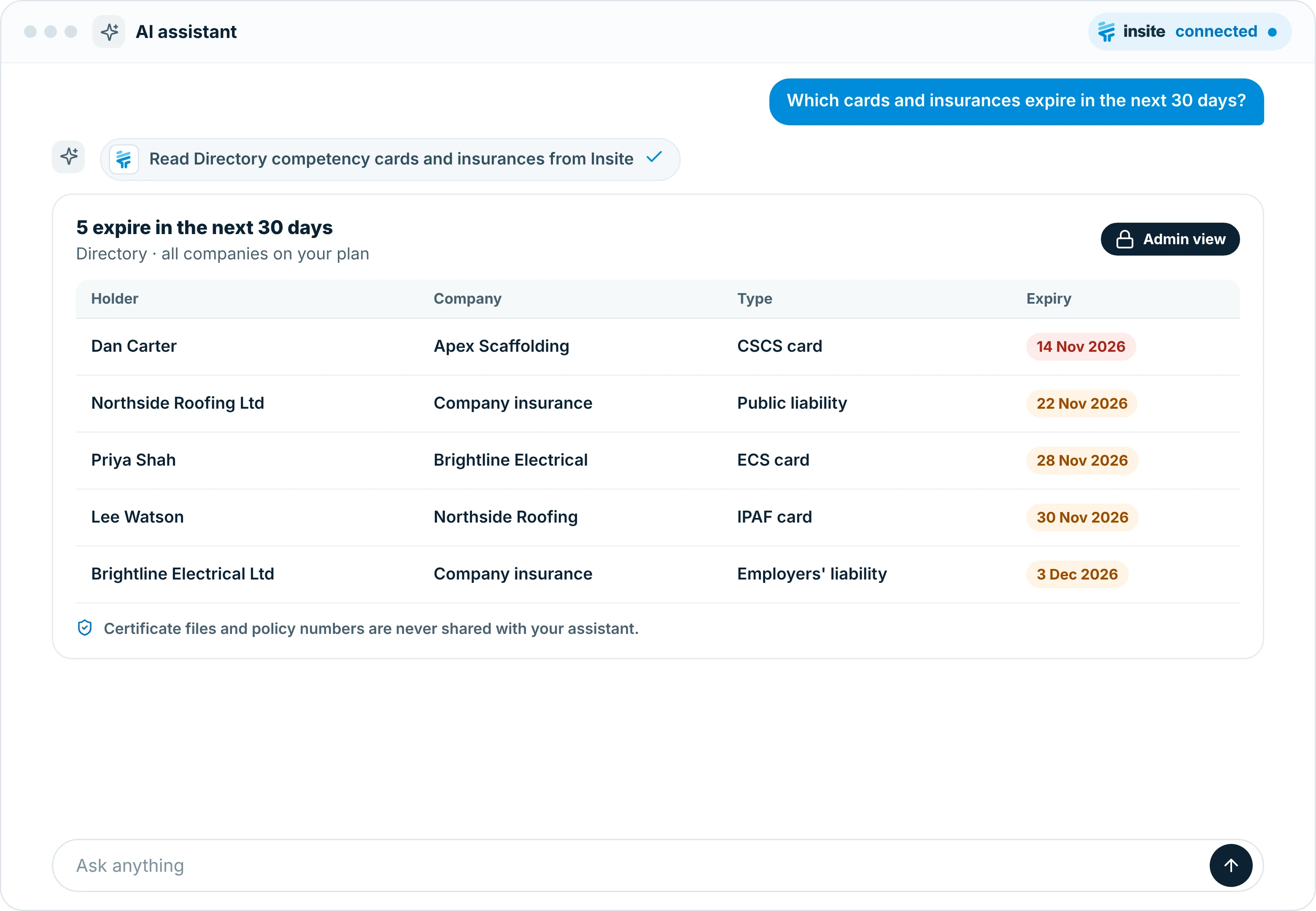
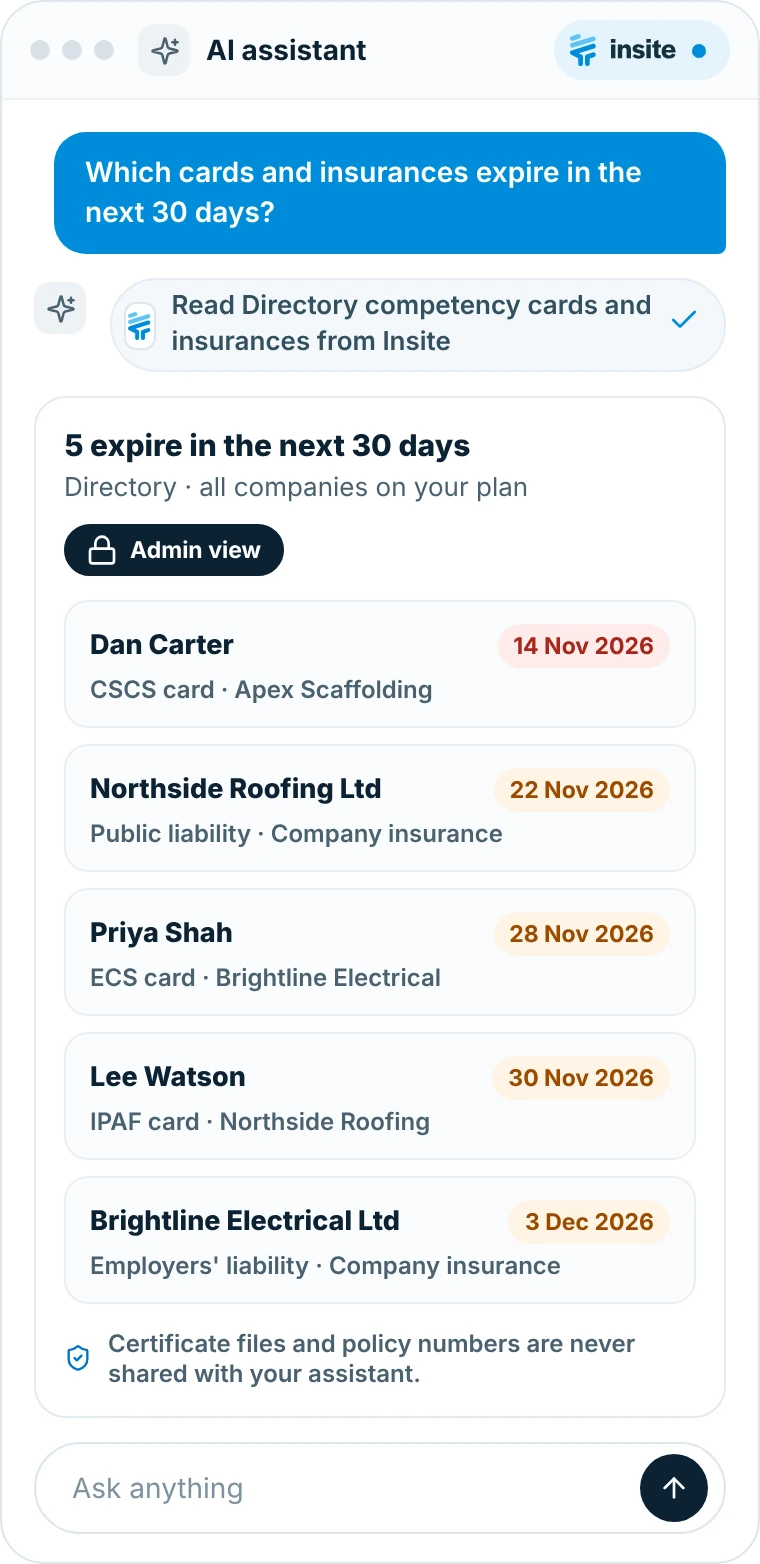
Plan admins, and project admins for their own projects, can ask which competency cards and insurances in the Directory expire soon.
Holder, company, type and expiry date
Admins only, using your existing Insite roles
Certificate files and policy numbers are never shared
CLIENT UPDATES
Weekly updates in minutes
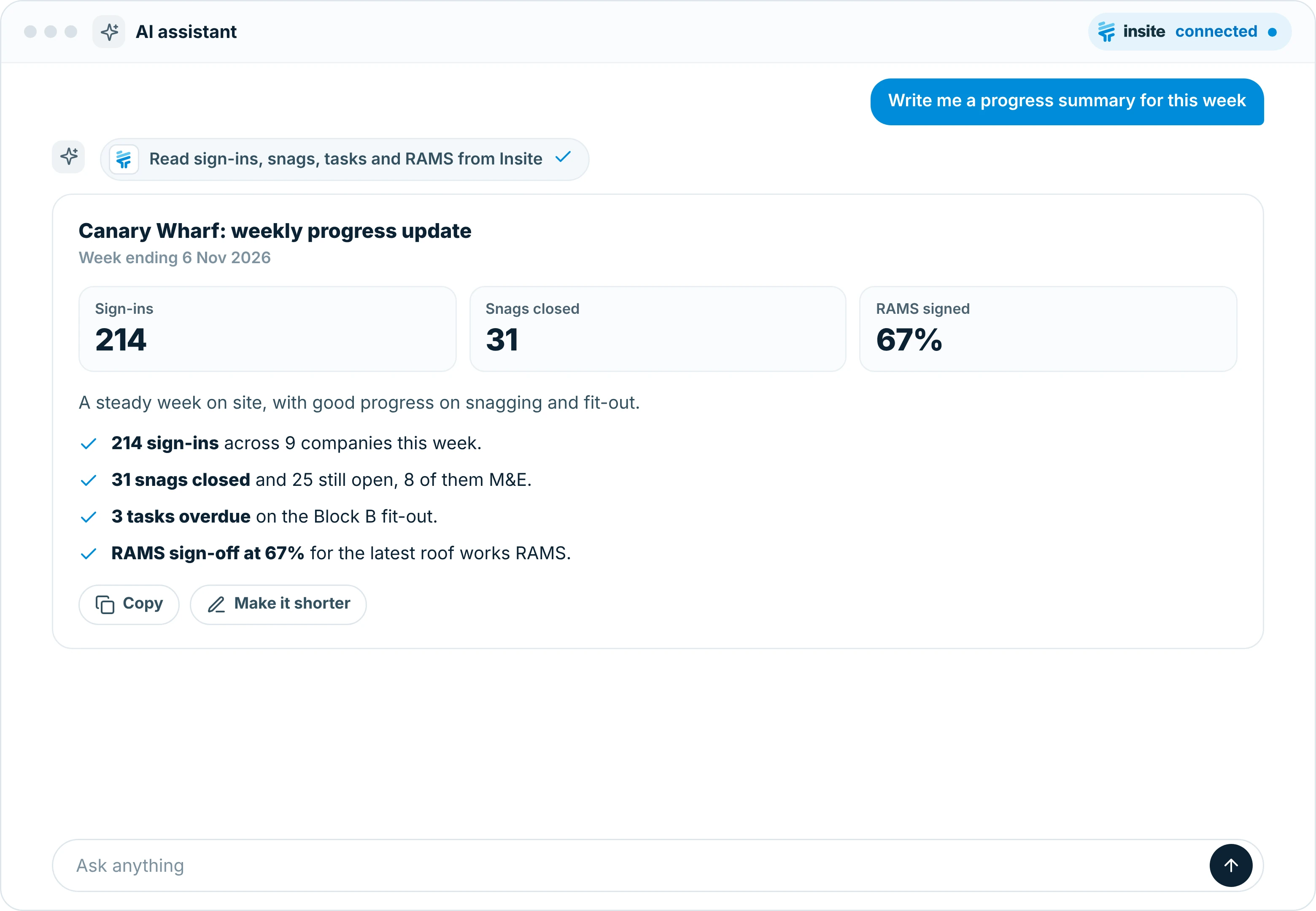
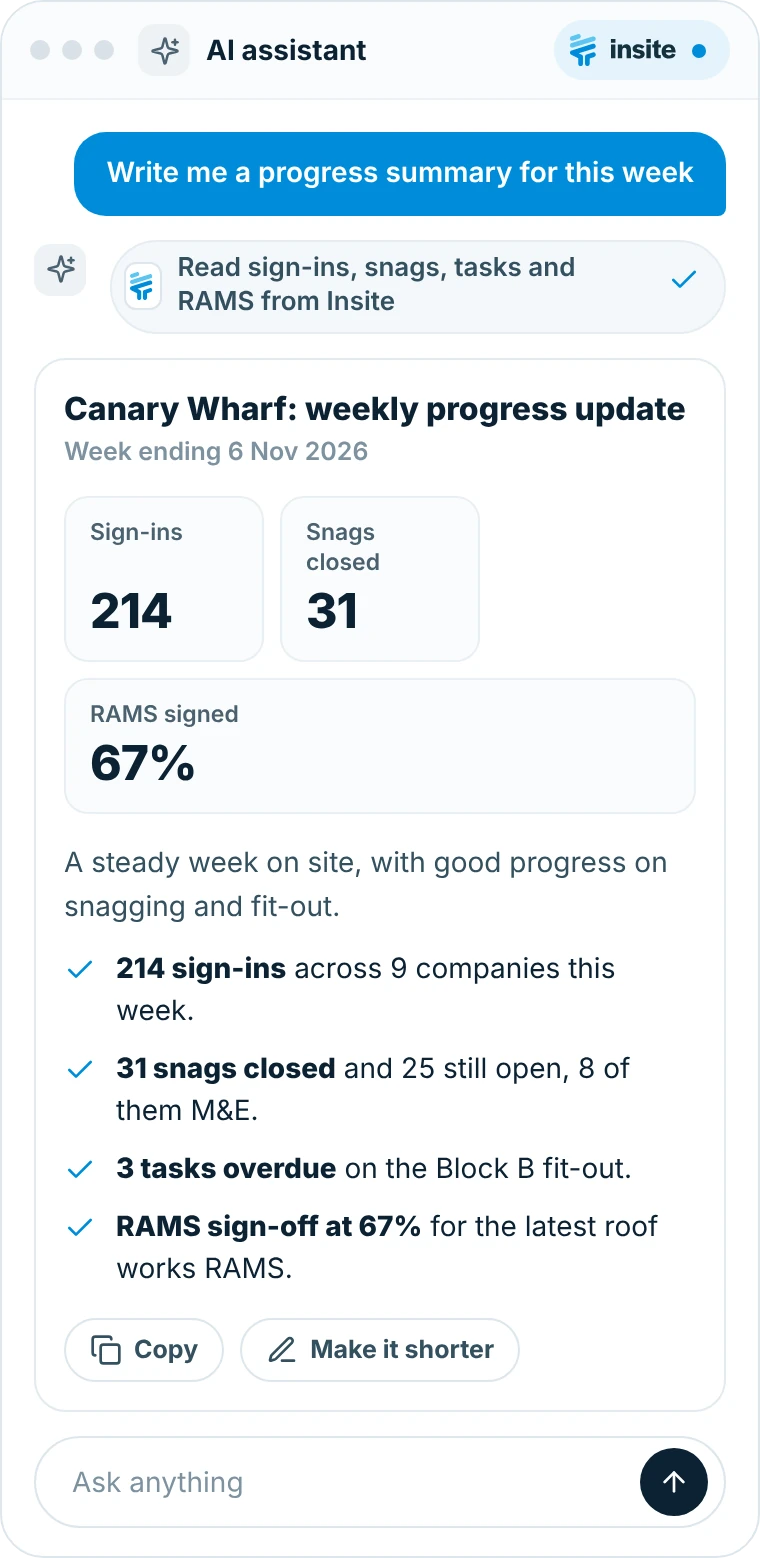
Ask for a progress summary for this week and your assistant drafts it from sign-ins, snags, tasks and RAMS on the project.
Figures from live project data, not a stale export
Edit the wording in your assistant before you send it
Nothing is changed in Insite
SECURITY AND CONTROL
Your data stays under your control
The connector works inside the permissions you already have in Insite.
Read only
Your assistant can read project data. It can’t create, edit or delete anything in Insite.
Your existing permissions apply
The assistant only sees what the signed-in person can already see in Insite.
Admins can switch it off
The connector is on by default. A plan admin can ask us to switch it off.
Only what you can see is shared
Only what the person can see is shared. Certificate files and policy numbers never are.
PULSE OR MCP
Two ways to use AI with Insite
Both are included on Premium and Premium Plus.
Pulse, built into Insite
Pulse is the AI assistant inside Insite, ready on every project.
Built in, with nothing to set up
EU-hosted
Works inside the Insite web and mobile apps
Explore Pulse →The assistant you already use
Use the AI assistant your business already runs, connected to live Insite data.
Works with any MCP-compatible assistant
Read only, with your existing permissions
Ask about Insite alongside your other work
Included on Premium and Premium Plus
Book a demo and we’ll show you how to connect Insite to your AI assistant.
Frequently asked questions
What is the Insite MCP connector?
The Insite MCP connector lets you add Insite to an AI assistant that supports the Model Context Protocol (MCP). You can then ask about your projects in plain English and get answers from live project data, limited to what you can already see in Insite.
Which AI assistants does it work with?
Any AI assistant that supports MCP connectors, such as ChatGPT, Claude, Gemini and Copilot. You add Insite as a connector in your assistant and sign in with your Insite account.
Can the assistant change anything in Insite?
No. The connector is read only. Your assistant can read project data to answer your questions, but it can't create, edit or delete anything in Insite.
What data can it see?
Only what the signed-in person can already see in Insite: projects, people and project tools, tasks, timesheets and sign-ins, RAMS signature status, forms, lists, inductions (with Workforce Management) and, for plan admins or project admins on their own projects, Directory competency cards and insurances. Certificate files and policy numbers are never shared.
Which plans include it?
The MCP connector is included on Premium and Premium Plus. It isn't available on Starter. See our pricing page for what each plan includes.
Can we switch it off?
Yes. The connector is on by default, and a plan admin can ask us to switch it off for your plan.
SAVINGS CALCULATOR
See what Insite could save you
Answer a few questions about your projects and team to get your own estimate.