BETA Meet Pulse, your AI construction assistant Explore
Programme

Plan, track and share your construction programme

Build and re-plan your construction programme in Insite, with links, critical path and a project calendar. Track progress against a baseline and log every delay, with one saved version shared across the project.
Trusted by contractors and teams across the UK

See the programme in action

The problem

Your programme shouldn't live in another tool

Most programmes are built in one tool while the work happens in another. That gap is where dates get missed.

The plan sits somewhere else

It lives in Microsoft Project or a spreadsheet, away from the tasks, forms and documents it drives.

Slips arrive unannounced

When one date moves, nobody downstream finds out until the knock-on lands on them.

No baseline, no evidence

Without a baseline you can’t show how far the job has moved, or why it moved.

Sub-contractors are last to know

They only see the plan when someone remembers to email them a PDF.
Features

Everything you need to plan and run the job

Construction programme software built into the platform your project team already uses, from the first draft to the final account.

Import your existing programme

Bring in Microsoft Project XML (Asta Powerproject can export it too) or the Insite Excel template. Activities, links, dates and % complete come across.

Automatic scheduling

Change a duration, link or date and every affected activity moves at once. There’s no reschedule button to remember.

Critical path and float

Both are recalculated on every change. Switch them on from the View menu to see what can’t slip.

A calendar for every project

Starts with Monday to Friday and England and Wales bank holidays. Edit it and see the effect on the completion date.

Contractual milestones

Mark key dates as zero-duration milestones and flag the contractual ones. They’re listed separately, on the phone too.

Progress against a baseline

Record actual start, % complete and actual finish each week. Remaining work re-forecasts from the progress date.

A delay register for EOT claims

Log each delay with its cause, impact in working days and evidence. Totals by cause are there when you need them.

Look-ahead and PDF export

Show just the next 2, 4 or 6 weeks. Export to PDF at the zoom and date range you choose.
Build and re-plan

Move one activity and the programme follows

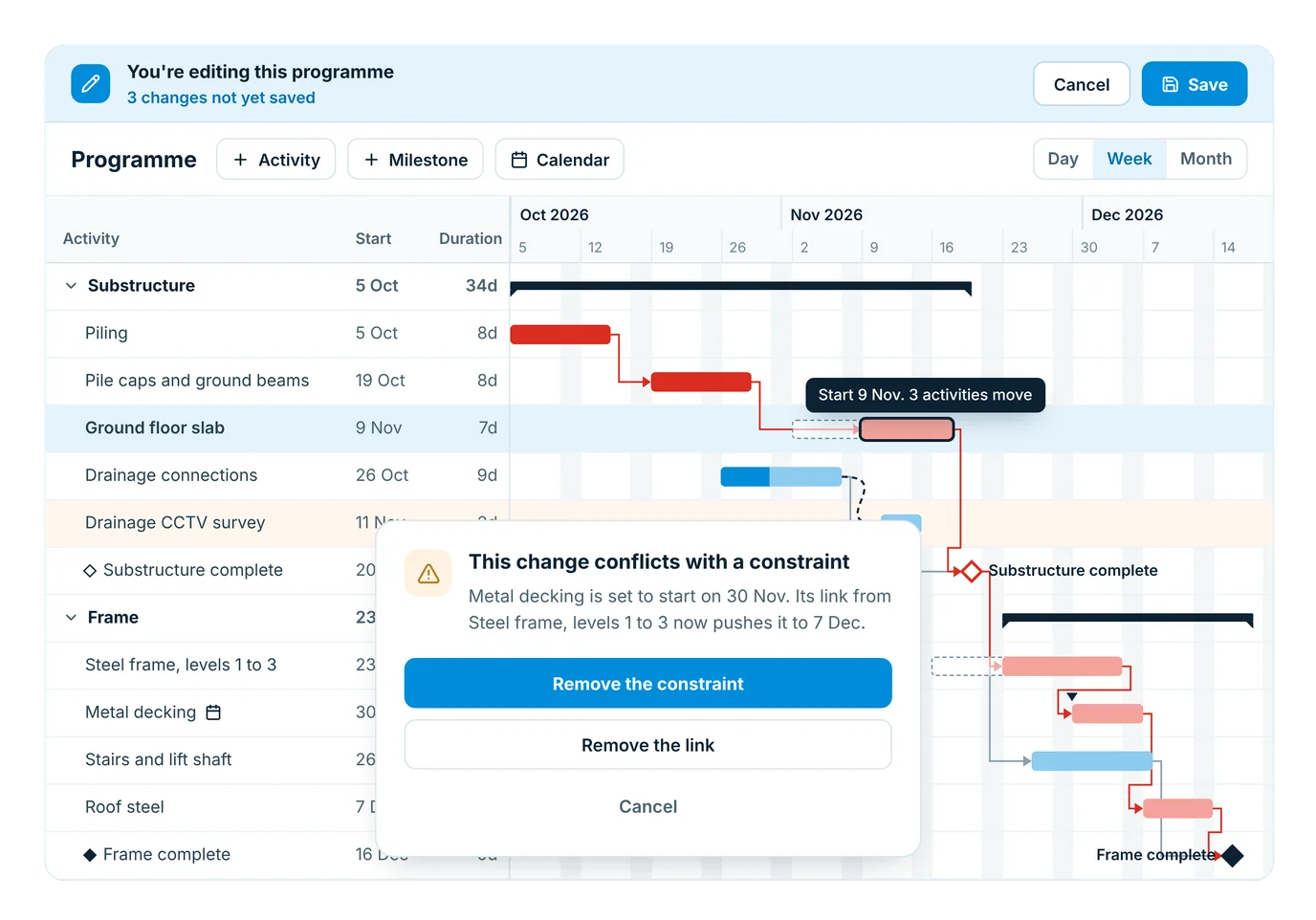
Drag a bar, change a duration or draw a link between two activities. Every affected activity moves at once and the critical path updates with it. There’s no reschedule button.
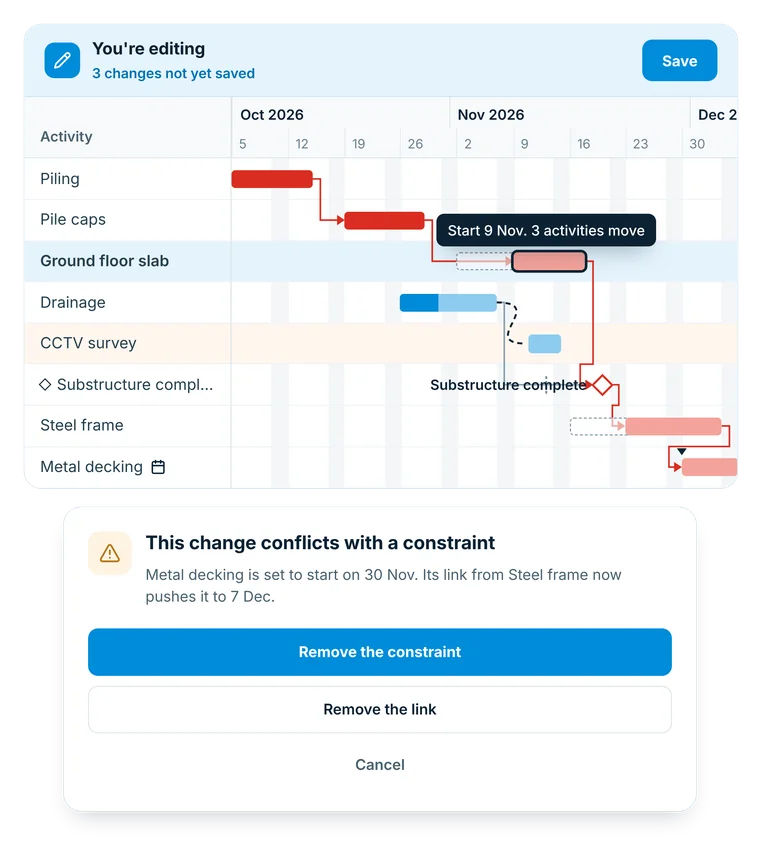
Moving an activity in the Insite programme editor, with linked activities following and a constraint conflict choice
All four link types, with positive or negative lag
Set a start by hand and it’s visibly marked as a constraint
If a constraint and a link disagree, you choose: remove the constraint, remove the link, or cancel
Moving an activity in the Insite programme editor, with linked activities following and a constraint conflict choice
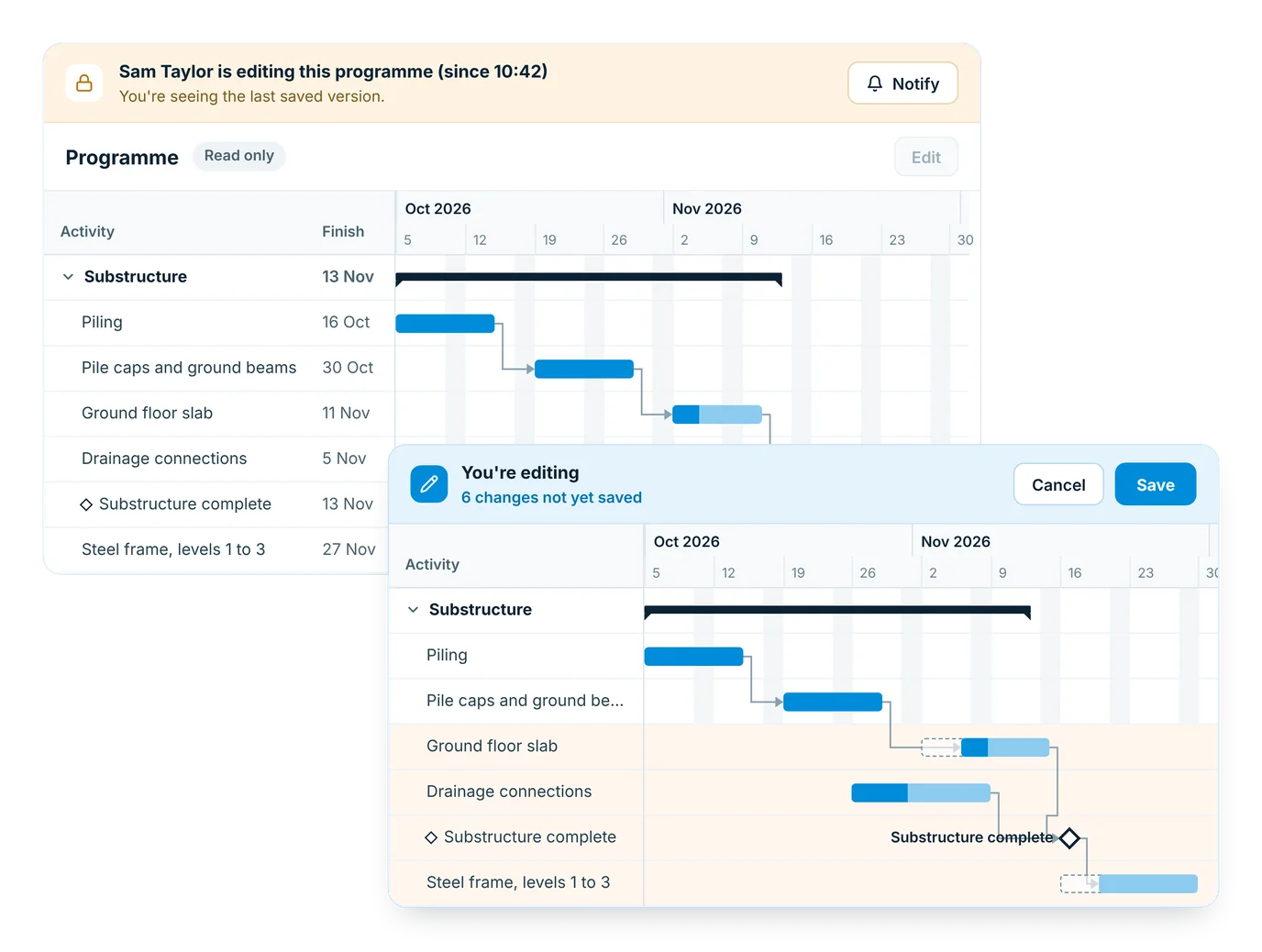
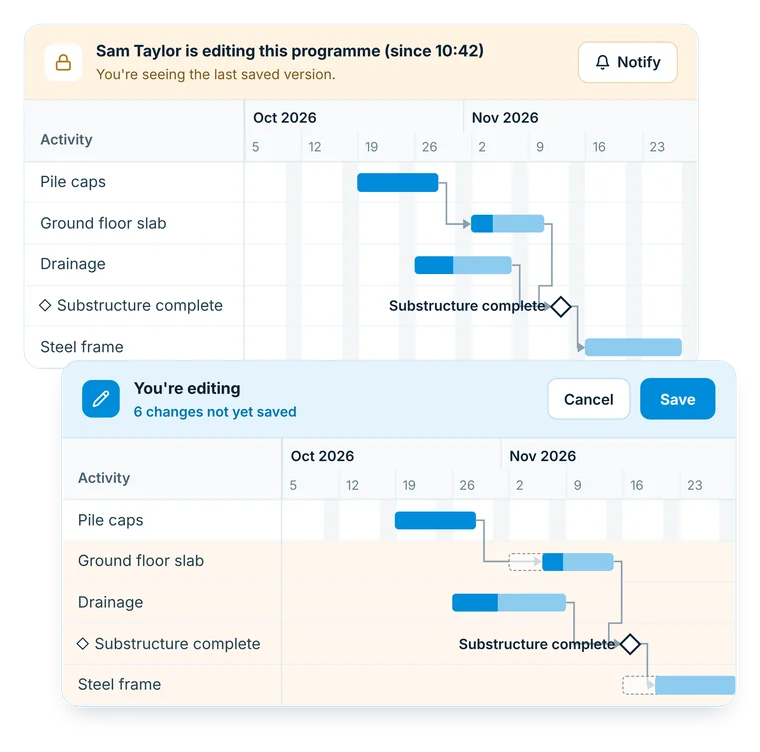
Edit mode in the Insite project programme: one person edits while everyone else sees the last saved version
Edit mode

One person edits, everyone else sees the saved version

The programme opens read-only. A project admin or programme editor presses Edit to check it out, and Save writes every change at once, so nobody ever sees a half-saved programme.
Edit mode in the Insite project programme: one person edits while everyone else sees the last saved version
Everyone else sees who is editing and since when, and can tap Notify
Make internal team members programme editors without making them project admins
Project admins can override a stuck checkout
Linked to the work

The programme drives the work

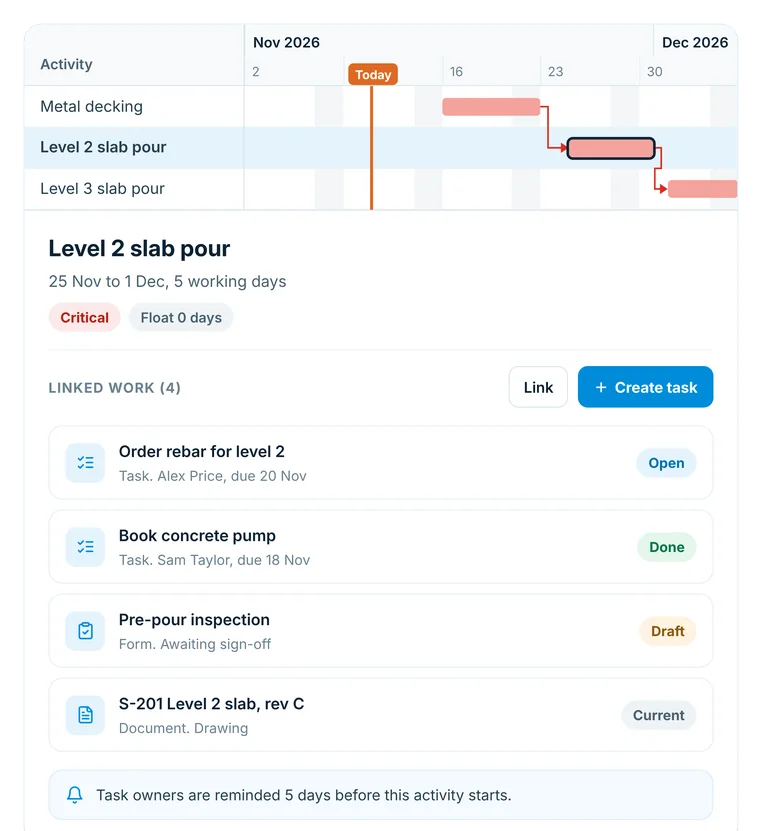
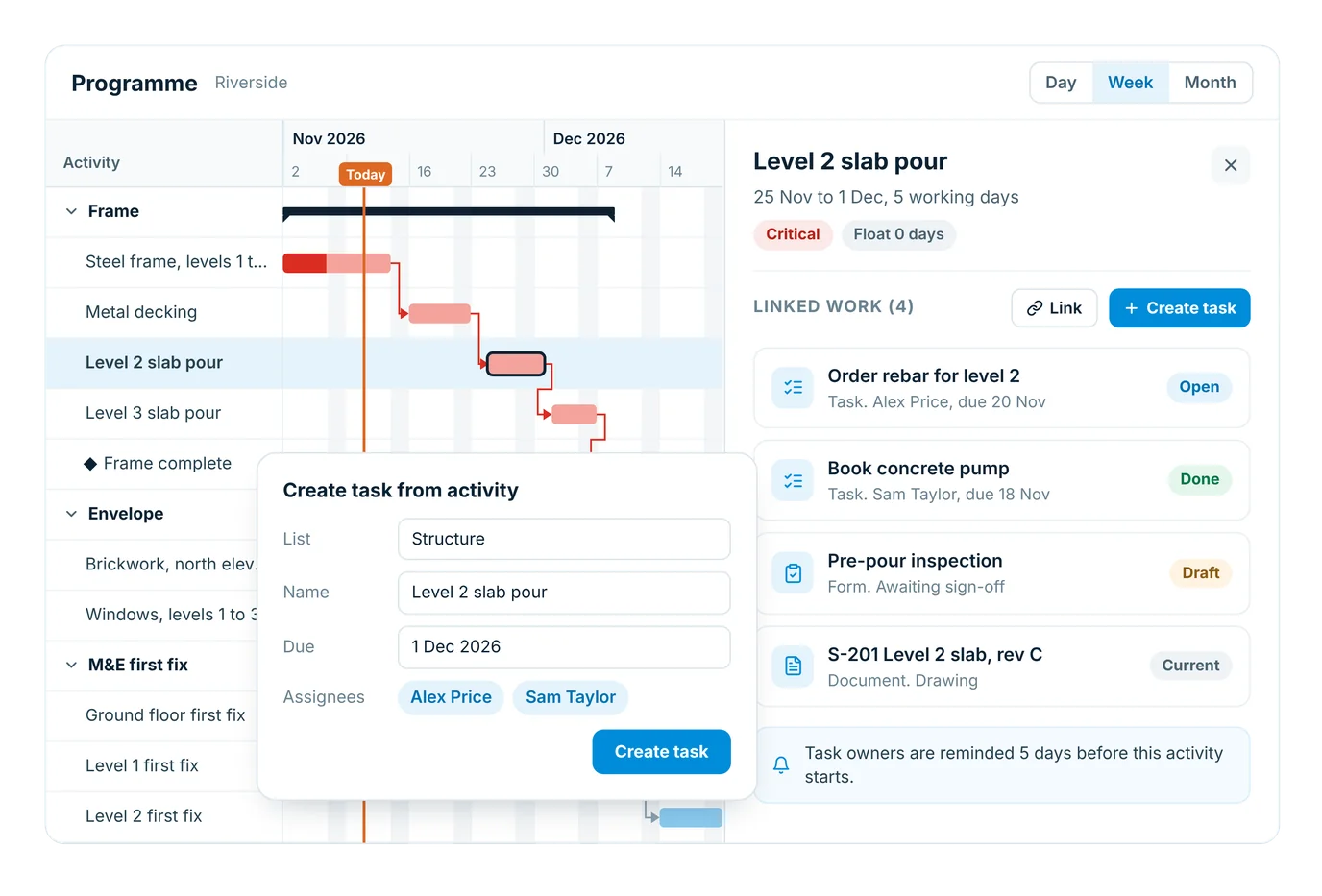
Link an activity to the tasks, forms, documents and site records it depends on. The people doing the work are prompted by the programme, instead of having to go and read it.
Open an activity to see everything linked to it and the state of each
Create a task from an activity: it takes the name and finish date, you pick the list and assignees
Task owners are reminded a set number of days before the activity starts
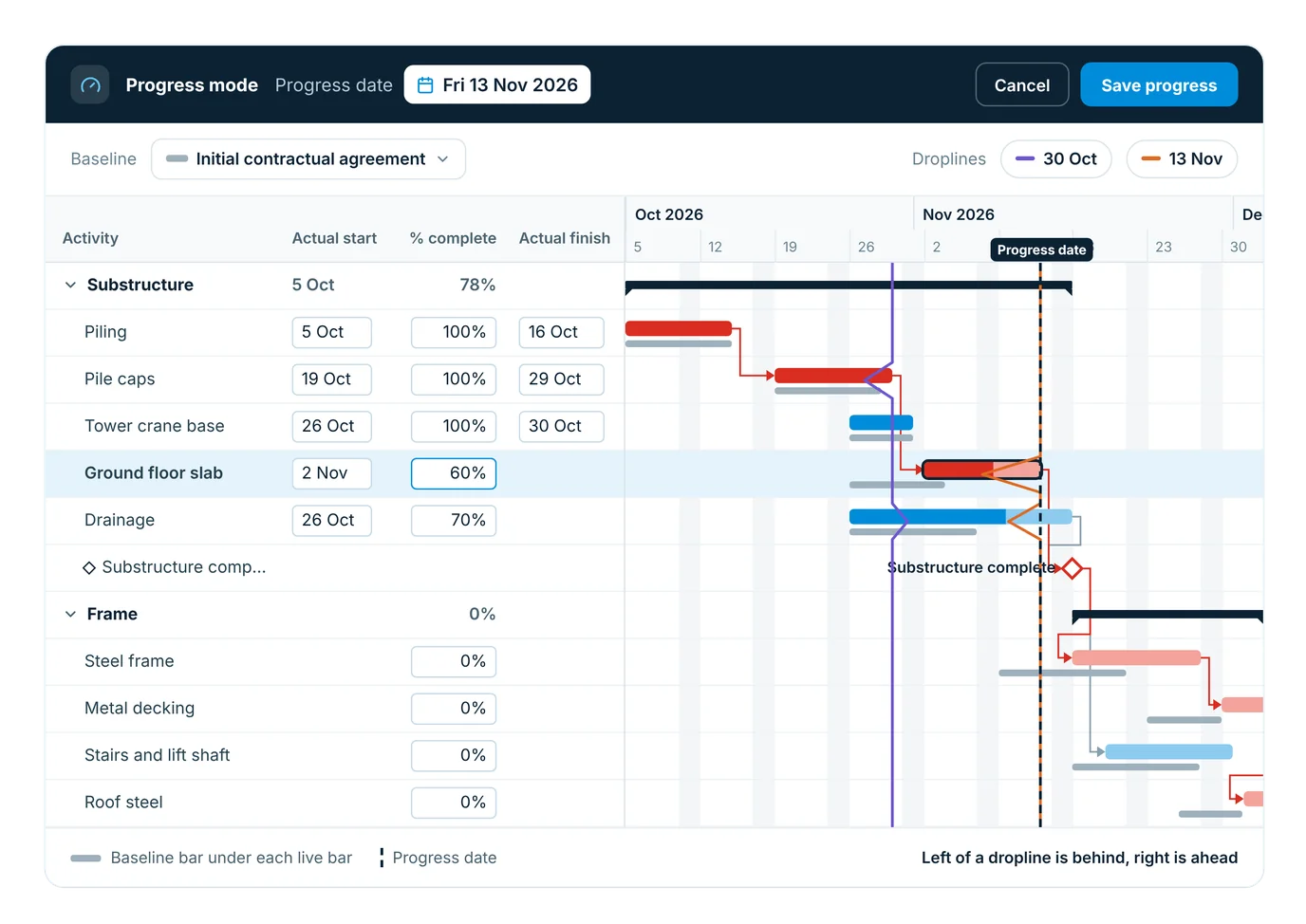
Progress mode in the Insite project programme with actuals, baseline bars and two droplines
Progress and baselines

Record progress and see the slip

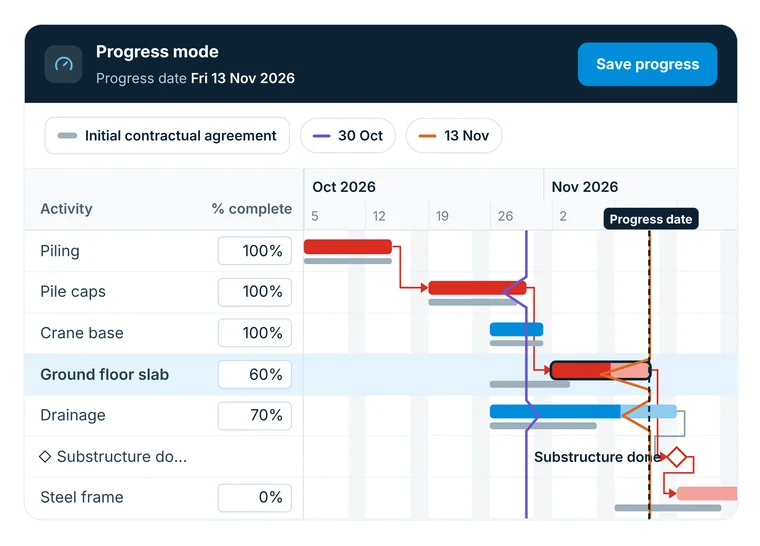
Progress mode turns the weekly update into a re-forecast. Set the progress date, record actual start, % complete and actual finish, and remaining work is scheduled from that date, measured against the baseline you agreed.
Progress mode in the Insite project programme with actuals, baseline bars and two droplines
Back-date the progress date if a weekly update was missed
Capture named baselines and show one as a slim bar under each live bar
Show several droplines at once: left of the line is behind, right is ahead
Delay register

Delays you can evidence

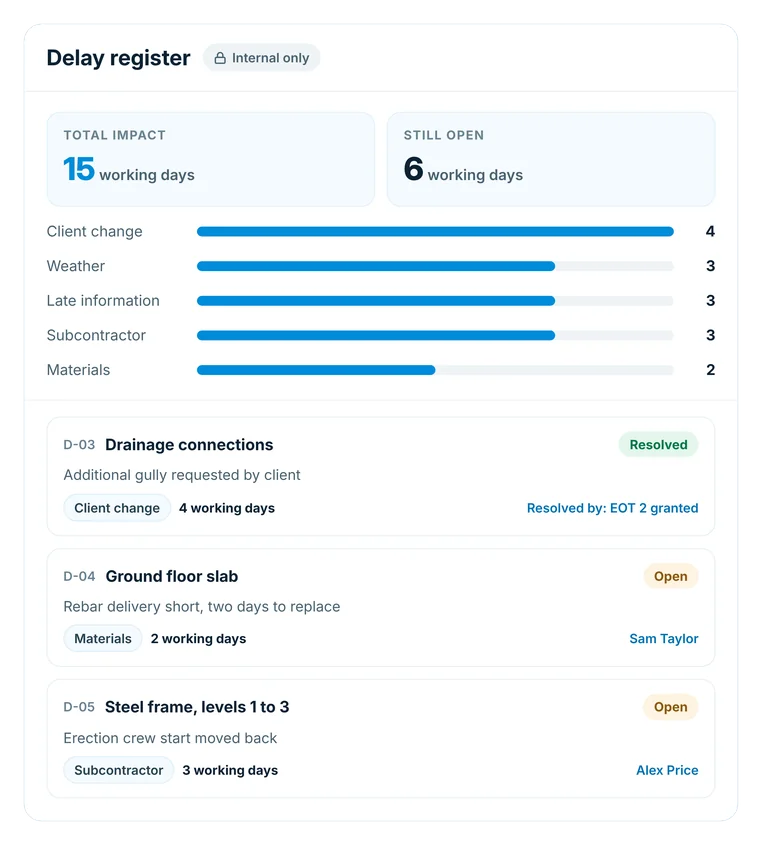
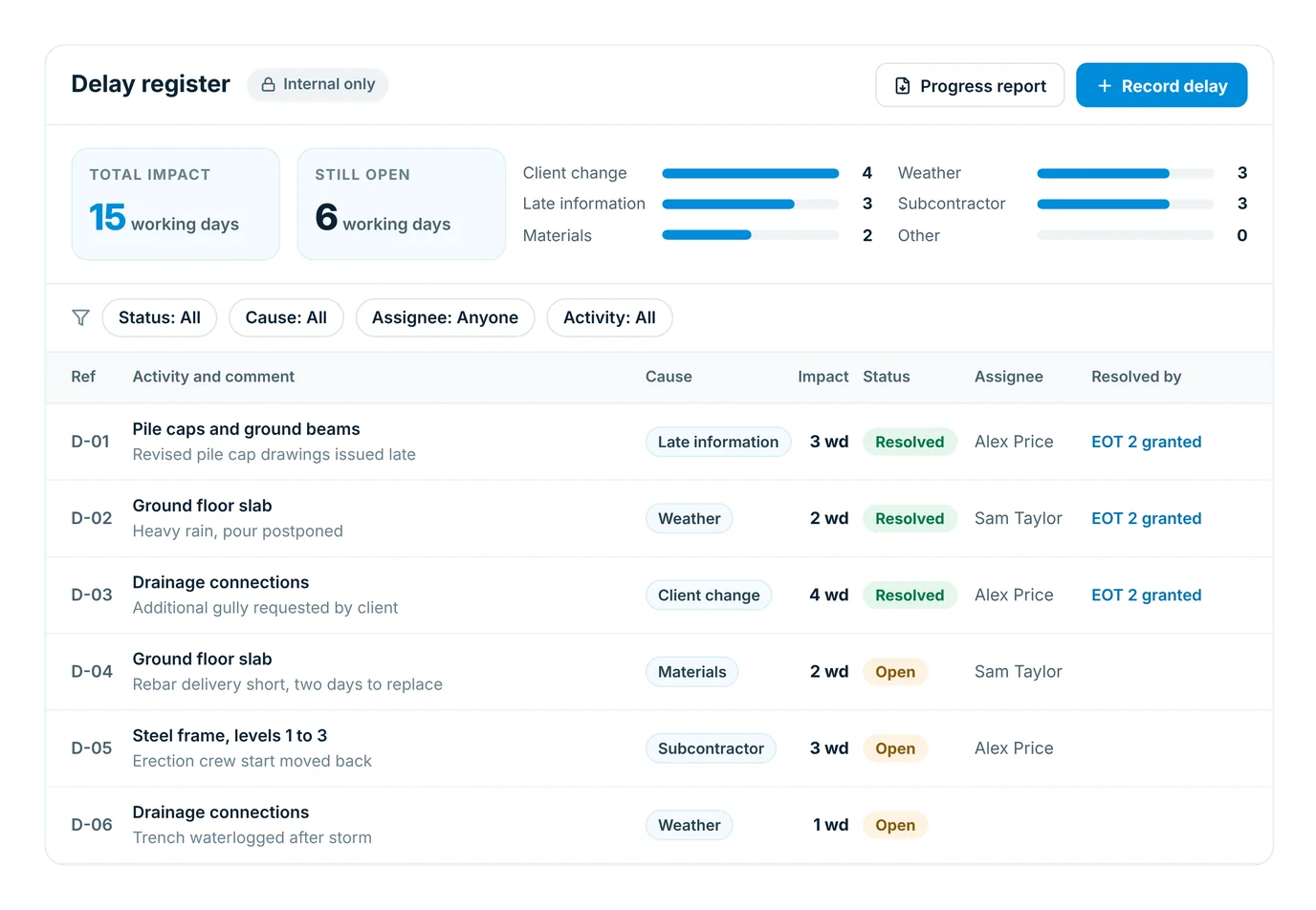
Log every delay against its activity as the job runs, with a cause, the impact in working days, a comment and attachments. It’s the evidence an extension of time claim needs, kept private to your team.
The delay register in Insite, with causes, impact in working days and status for each delay
Filter by status, cause, assignee and activity, with total impact overall and by cause
Link a delay to the baseline that resolved it, such as “EOT 2 granted”
Export a progress report against a chosen baseline to PDF
The delay register in Insite, with causes, impact in working days and status for each delay
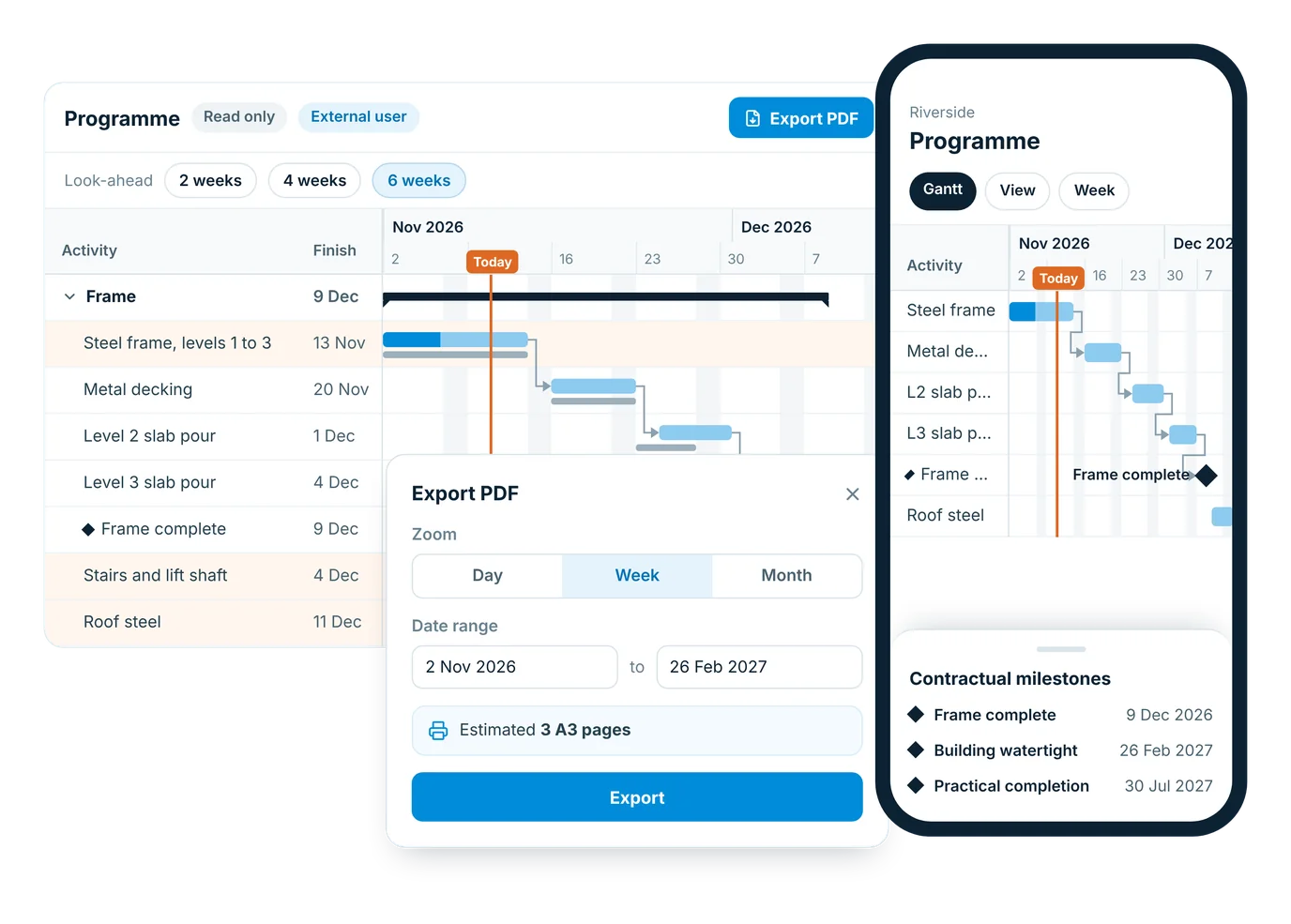
The Insite project programme on a phone, a sub-contractor read-only view and the PDF export options
Sharing

The whole project reads the same programme

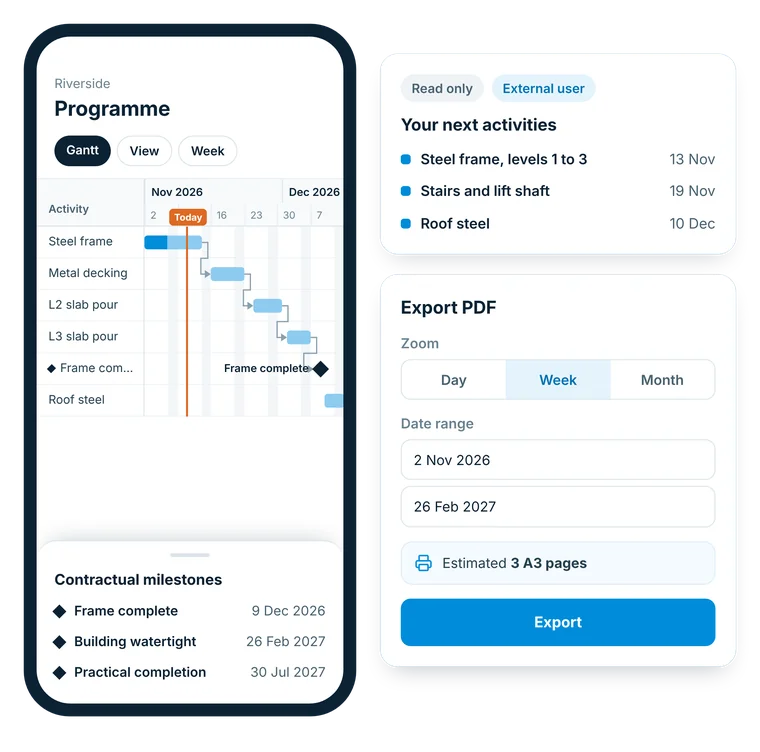
Everyone on the project can read the saved programme and export it, sub-contractors and other external users included. On site, it opens as a read-only compact Gantt on the phone.
The Insite project programme on a phone, a sub-contractor read-only view and the PDF export options
Contractual milestones are listed separately, on the phone too
Look-ahead shows only the next 2, 4 or 6 weeks
PDF export at the zoom and date range you choose, with an estimated A3 page count

Bring your programme into Insite

Book a demo and we’ll show you how to build, share and progress a programme in Insite.
How it works

From first draft to the weekly update

1

Import or build your programme

Import Microsoft Project XML or the Insite Excel template, or build it in Insite with links and a project calendar.
2

Link activities to the work

Connect the tasks, forms and documents each activity drives, or create tasks straight from the programme.
3

Baseline it and share it

Capture a named baseline. The whole project team then reads the same saved programme, on desktop or phone.
4

Record progress every week

Update actuals in progress mode, log delays as they happen and report against your baseline.
Who it's for

Built for the whole team

Planners and contracts managers

Build, re-plan and update progress on desktop, with baselines, droplines and a delay register to back every change.

Project managers

See what’s late, what’s critical and what’s next, and why, from one saved programme.

Site managers

Read the programme on a phone, with contractual milestones and activity details to hand.

Sub-contractors

See where your work sits in the programme, and export it to PDF when you need it.

Frequently asked questions

What is the project programme in Insite?
It’s your project programme, built into Insite. Planners build and re-plan it as a Gantt with links, critical path and a project calendar, and the whole project team reads the same saved version.
Can I import my programme from Microsoft Project or Asta?
Yes. Import a Microsoft Project XML file (Asta Powerproject can export one too) or the Insite Excel/CSV template into an empty programme. Activity names, grouping, start dates, durations, links, working days, non-working dates and % complete come across.
Does it work out the critical path?
Yes. The critical path and float are recalculated on every change, and you can show them with a toggle in the View menu.
Who can edit the programme, and what if two people want to?
Project admins and programme editors can edit, one person at a time. Everyone else sees who is editing and since when, can tap Notify, and keeps seeing the last saved version until the editor saves.
How do I record progress against the programme?
Switch to progress mode, set the progress date and record actual start, % complete and actual finish. Group progress rolls up automatically and remaining work re-forecasts from the progress date. Site diaries and progress photos give you the evidence behind each update.
What are baselines and droplines?
A baseline is a permanent, named snapshot, such as "Initial contractual agreement", that you measure slippage against. A dropline saves every activity’s % complete on a date and shows it as a jagged line: left of the line is behind, right is ahead.
Can I log delays for an extension of time claim?
Yes. The delay register records each delay against an activity with its cause, impact in working days, comments, attachments and the baseline that resolved it. The progress report exports variance and the register to PDF.
Can an activity create tasks for my team?
Yes. A task created from an activity takes its name and finish date, and you choose the list and assignees. The task owner is reminded a set number of days before the activity starts.
Can sub-contractors see the programme?
Yes. Everyone on the project can read and export the programme, including sub-contractors and other external users. Delays and the delay register stay internal to your team. Workforce Management covers who is on site.
Which plans include the project programme?
It’s included in the Premium plan and every plan above it, including Premium Plus (see pricing). Talk to us and we’ll show you how it fits your projects.

Savings calculator

See what Insite could save you